Hi There,
after playing around quite a lot with AI, MCP and different extensions inside Polarion, I wanted to try something slightly different.
Instead of building another isolated AI Use Case, I wanted to connect several of them.
The question was basically:
What happens if AI does not only support one individual engineering activity, but follows the information through a complete process inside Polarion?
For this experiment I created a small end-to-end Change Management scenario inside my DrivePilot project.
And it starts with something very simple:
Meeting Notes.
From there, the information moves through several engineering steps:
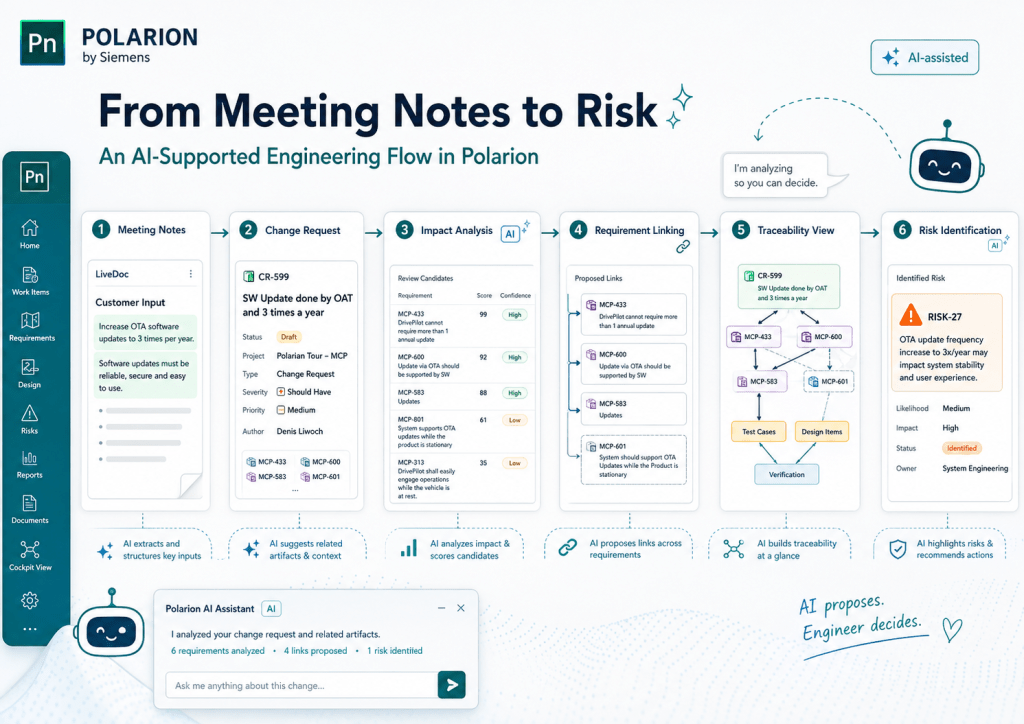
Meeting Notes → Change Request → Impact Analysis → Requirements → Traceability → Risk
The complete example can be seen in the video below.
So let us have a closer look at what is happening.
Starting with the Meeting Notes
The example starts with meeting minutes from a customer discussion.
Nothing special so far.
The current project assumes that the product supports two Over-the-Air (OTA) software updates per year.
During the meeting, however, the customer raises a new expectation:
The product should be capable of supporting at least three OTA software updates per year instead of two.
At first sight, this sounds like a relatively small change.
But from an engineering perspective, increasing the supported OTA update frequency can potentially affect quite a bit more than only one Requirement.
It could influence:
- System Requirements
- Software Requirements
- backend and update infrastructure
- validation and test effort
- release planning
- cybersecurity activities
- operational costs
- and potentially existing risks
And this is exactly where the example starts.
Finding Engineering Information in the Meeting
The meeting minutes are stored directly inside a Polarion LiveDoc.
I added an AI-supported extension that analyses the document and looks for information which could become relevant engineering artefacts.
For example:
- Requirements
- Tasks
- Responsibilities
- Change Requests
In my example, the request to support more OTA software updates per year is detected as a potential Change Request.
What I like about this approach is that the AI does not simply create something in the background.
It first shows what it has found and lets me decide what I want to do with it.
Once I accept the proposal, the Change Request becomes a normal Polarion Work Item and therefore part of the controlled engineering process.
So we have already moved from:
unstructured meeting information
to:
managed engineering information
without leaving Polarion.
Moving into Change Management
Once the Change Request has been created, I switch into the Change Management view.
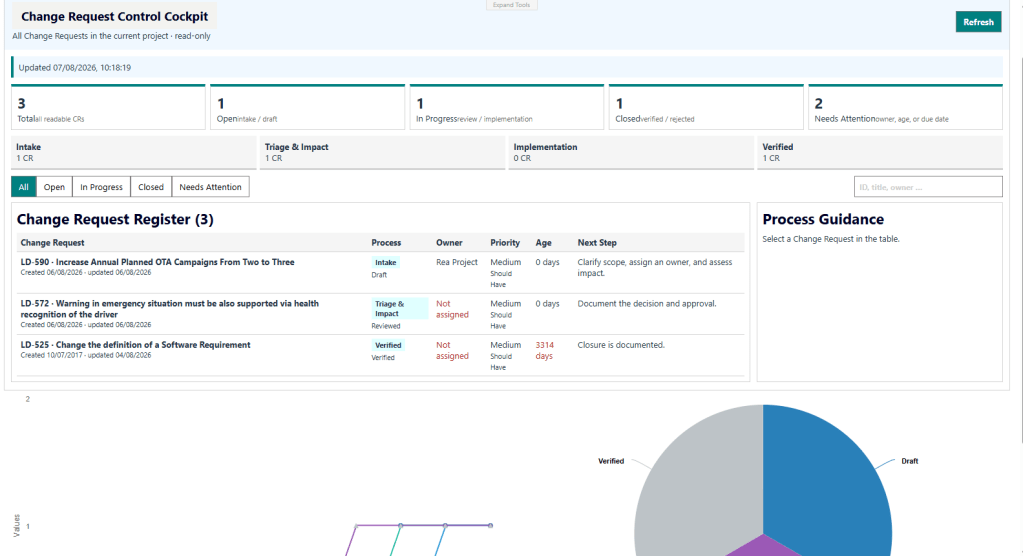
I built this view to provide a little more context than only looking at the Work Item itself.
For example, I can directly see information such as:
- current status
- priority
- responsible person
- affected areas
- process guidance
- and possible next activities
The Change Request in this example is about increasing the supported OTA software update capability from two to at least three updates per year.
At this point, the request is formally managed inside Polarion.
But we still do not know what this change actually affects.
And this is where the next extension comes into play.
AI-Supported Impact Analysis
For the Impact Analysis I added another AI-supported extension directly to the Change Request.
The basic question is quite simple:
Which existing Requirements could be affected if the product needs to support more OTA software updates per year?
In the demo, the AI searches through 71 Requirements from the project and identifies potentially relevant candidates.
But I did not want the result to be only a list of keyword matches.
For every candidate, the analysis also provides additional information such as:
- a score
- confidence
- an explanation
- and the reason why the Requirement could be affected
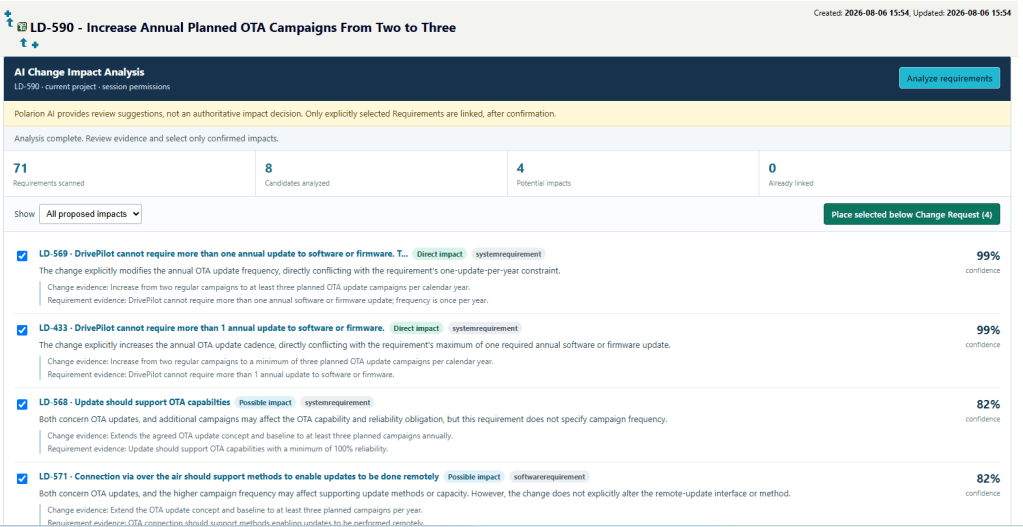
This makes the result much easier to understand and review.
For example, a Requirement dealing with software update handling, update infrastructure or update frequency might receive a higher score because its engineering context is closely related to the requested change.
The user can then review the proposed candidates and decide which Requirements are really impacted.
Again, nothing is linked automatically.
The AI proposes.
The engineer decides.
Only the accepted relationships become part of the actual Polarion traceability.
That principle is used throughout the complete example:
AI proposes – the engineer decides.
Following the Traceability
Once the impacted Requirements are connected to the Change Request, we can move deeper into the engineering context.
I open one of the affected Requirements and switch to my graphical Traceability View.
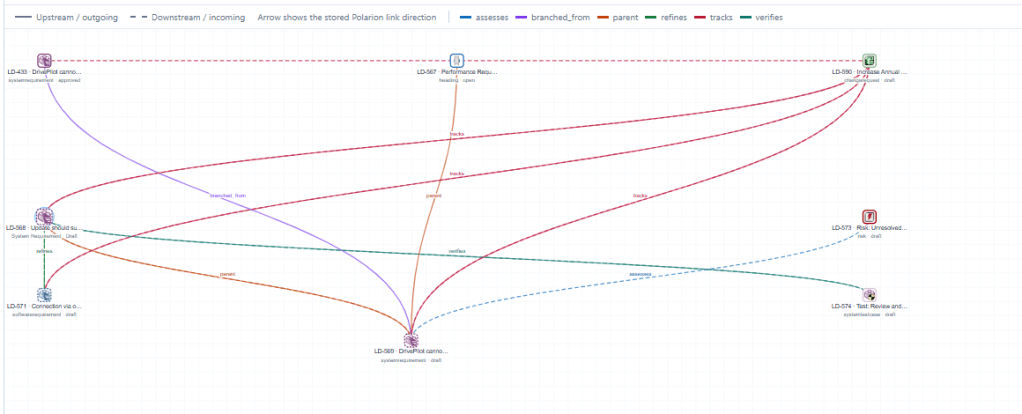
This extension visualizes the engineering relationships around the selected Work Item.
Instead of opening individual Requirements and following links one by one, I can see the surrounding network directly.
Depending on the selected Work Item, this can include:
- related Requirements
- upstream and downstream relationships
- Test Cases
- Change Requests
- Risks
- and other connected engineering artefacts
This is where the change starts becoming much more tangible.
The original information came from one sentence inside customer meeting notes.
Now that information is already connected to a Change Request and to potentially affected engineering Requirements.
And because everything stays inside Polarion, I can follow this information through the digital thread.
And Why Not Let AI Look at the Graph?
At this point I had another idea.
If the traceability information is already available, why should I only visualize it?
Why not let AI analyse it as well?
So I added another AI-supported action directly to the Traceability View.
This time, the AI does not only receive one individual Requirement.
It receives more of the engineering context around it.
The analysis can then look for things such as:
- missing verification coverage
- questionable or incomplete relationships
- possible follow-up activities
- and potential engineering risks
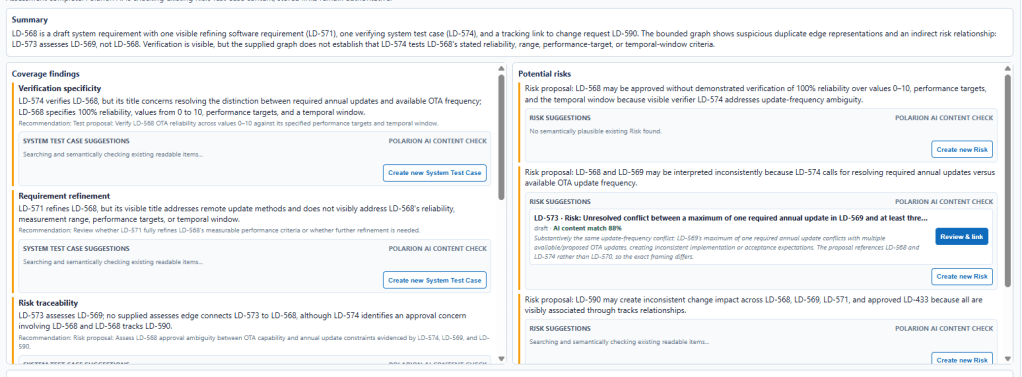
This is an important difference.
The AI is not only analysing the text of the Requirement.
It can use the surrounding engineering context to understand what might be missing or what could become relevant because of the change.
And in my OTA example, the analysis identifies a potential risk related to supporting the increased number of software updates.
From a Finding to a Real Risk
The last step follows exactly the same principle again.
The AI identifies a possible risk and prepares a proposal.
But it does not immediately create a new Risk Work Item.
First, I can review the suggestion.
If the finding makes sense, I approve it and the Risk is then created inside Polarion.
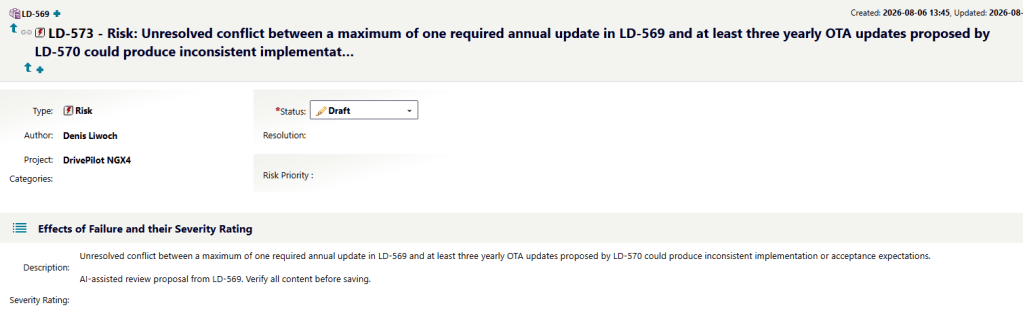
And this is where the whole story comes together.
We started with one sentence in customer meeting notes:
The product should support more OTA software updates per year.
From there, the information moved through the engineering process:
Customer Meeting
↓
Potential Change
↓
Managed Change Request
↓
Affected Requirements
↓
Traceability Context
↓
AI-Supported Risk Identification
↓
Managed Engineering Risk
What started as unstructured information has now become part of a controlled and traceable engineering process.
And everything stays connected inside Polarion.
The Interesting Part Behind the Demo
Now to the part which might be interesting for those of you who like to look a little bit behind the scenes.
This demo is not one huge AI application.
I actually used several Polarion extensions and connected them through the engineering process.
And this is probably the part I like most about the example.
Each extension supports one specific activity.
The Meeting Notes extension works with the LiveDoc.
The Change Impact extension works with the Change Request and the available Requirements.
The Traceability View works with the selected Work Item and its relationships.
And the Risk proposal uses the engineering context identified during the previous analysis.
So technically, the flow is much more like this:
Polarion LiveDoc
→ AI Meeting Analysis
→ Change Request
→ AI Impact Analysis
→ Affected Requirements
→ Graphical Traceability View
→ AI Engineering Context Analysis
→ Risk Proposal
→ User Approval
→ Polarion Risk Work Item
The AI capabilities are therefore not sitting somewhere next to the engineering process.
They are inserted exactly where they can support the user.
Several Extensions – One Process
Another thing I wanted to try with this example was how multiple Polarion Form Extensions can work together as one continuous experience.
Individually, each extension is relatively focused.
One extension analyses the meeting.
Another one supports the Change Request.
Another one visualizes Traceability.
Another analysis looks at the surrounding engineering context.
But because they all work with the same Polarion information, the result feels like one connected process.
And that is quite an important point for me.
I did not want to build one giant:
“Analyse everything with AI”
button.
Instead, I prefer smaller AI-supported activities at the point where they actually make sense.
For example:
Analyse Meeting Notes
↓
Analyse Change Impact
↓
Analyse Traceability
↓
Propose Risk
Each step has a clear purpose.
And after every important step, the engineer can review the result before moving forward.
For me, this makes the whole interaction much easier to understand.
Context Is Everything
One thing I learned while building these examples is that the actual AI prompt is only one part of the story.
The much more interesting question is:
What context does the AI receive at this point in the process?
When I analyse the meeting document, I need the meeting content.
When I analyse the Change Request, I need the Change Request together with possible affected Requirements.
When I analyse Traceability, I need the engineering relationships around the selected Work Item.
Without this context, the AI could still generate a nice answer.
But a nice answer is not automatically a useful engineering answer.
And this is where Polarion becomes really interesting in combination with AI.
Polarion already contains a lot of this context:
- Work Item types
- Requirements
- relationships
- documents
- workflow states
- responsibilities
- Test Cases
- Risks
- Changes
The extensions can use the context which is relevant for exactly the engineering activity the user is currently performing.
Human in the Loop
You will probably notice something several times in the video.
The AI proposes something.
And then it stops.
This is intentional.
For important engineering actions such as:
- creating the Change Request
- linking impacted Requirements
- creating follow-up activities
- creating a Risk
I still want the user to make the final decision.
Especially once AI starts interacting with real ALM data, I think this becomes very important.
There is a big difference between an AI generating some text in a chat window and an AI creating a Requirement, Risk or Traceability Link which becomes part of the engineering project.
So throughout the complete flow the basic principle stays the same:
AI proposes – the engineer decides.
What I Like About This Example
I have already played around with several individual AI Use Cases inside Polarion.
But this example feels a little different.
Not because one individual AI capability is extremely complex.
The interesting part is how everything connects.
The output of one activity becomes the context for the next activity.
The process gradually moves from unstructured customer information towards managed engineering information.
Meeting Notes
→ Change
→ Impact
→ Traceability
→ Risk
And throughout the complete process, Polarion remains the place where the engineering information lives and where all the relationships stay visible.
For me, that is probably the biggest takeaway from this experiment.
AI becomes much more useful once it understands where it currently is in the engineering process and which context belongs to that step.
What Could Come Next?
There are still many things which could be added to this flow.
For example, AI could also help to:
- identify affected Test Cases
- propose additional verification activities
- compare the Change against existing Risks
- analyse downstream Software Requirements
- identify similar historical Changes
- check whether existing tests still provide enough coverage
- prepare a Change Control Board summary
- or let different engineering Agents analyse the same Change from different perspectives
And especially the last point is something I am currently experimenting with quite a lot.
But that is probably a topic for another post. 🙂
Final Thoughts
This was mainly an experiment to see how far I could connect different AI-supported activities through one engineering process inside Polarion.
And I really like where it ended up.
We started with normal customer meeting notes.
A short time later, we had a managed Change Request, identified potentially affected Requirements, followed the Traceability and created a new engineering Risk.
Not by replacing the existing engineering process.
But by adding AI support at several points inside the process.
For me, that is a much more interesting direction than simply putting another chatbot next to an ALM tool.
The engineering process stays.
Polarion stays.
The engineer stays in control.
AI just helps to connect the dots a little faster.
Thank You

